Intro
firebase 에서는 부분 문자열을 통해서 문자열을 검색할수 있는 기능이 없다. 이로 인해서 검색을 구현할 때에는 완벽히 똑같은 문자열을 통해 검색하거나, 외부 라이브러리를 써야한다. 그러나 firebase 내에서도 부분 문자열을 통한 검색이 구현 가능하다.
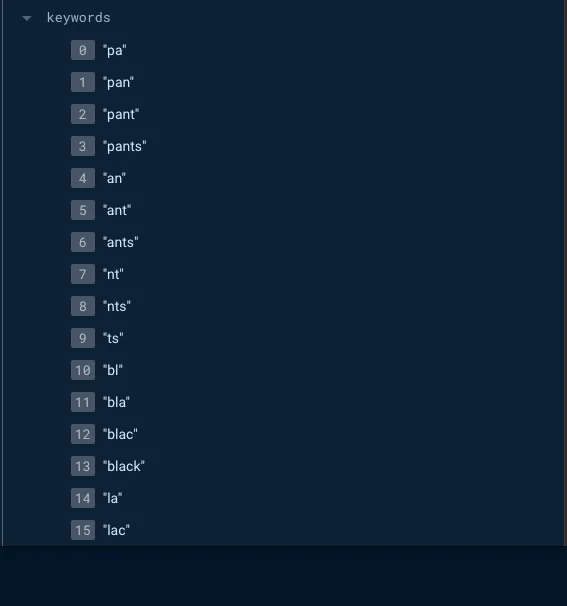
이와 같이 미리 가능한 모든 키워드 조합을 만들어내어 Array 에 저장하는 방법이다.
Algolia 나 ElasticSearch 를 붙일 예산은 없고, where("name", ">=", query) 같은 편법은 다국어 데이터를 만나면 바로 깨지기 때문에, 직접 키워드를 뽑아 던져 넣는 방식으로 해결했다.
구현 방법
export const cleaningText = (text: string): string => {
  const regEx = /[`~!@#$%^&*()_|+\-=?;:'",.<>\{\}\[\]\\\/ ]/gim;
  const cleanText = text.replace(regEx, "").toLowerCase();
  return cleanText;
};

export const createKeywords = (texts: string[]): string[] => {
  const keywords = new Set<string>();

  texts.forEach((text) => {
    const cleanText = cleaningText(text);
    const length = cleanText.length;

    for (let i = 0; i < length; i++) {
      let temp = "";
      for (let j = i; j < length && j < i + 11; j++) {
        temp += cleanText[j];
        if (temp.length >= 2) {
          keywords.add(temp);
        }
      }
    }
  });

  return Array.from(keywords);
};
text 배열을 입력으로 받아, 2 글자 이상, 10 글자 이하인 부분 문자열을 생성해준다. 처음엔 1글자 키워드도 넣었는데, “a”, “e” 같은 값으로 컬렉션이 뒤덮여서 쿼리 속도가 떨어졌다. 그래서 길이를 제한했다.
문서 저장 시에는 문자열 필드만 추려서 키워드를 생성한 뒤 Firestore 에 저장한다:
const stringFields = extractStringFields(rest);
const keywords = createKeywords(stringFields);

await addDoc(collection(db, "products"), {
  ...newProductData,
  keywords,
  createdAt: serverTimestamp(),
});
extractStringFields 가 문자열 배열까지 펼쳐주기 때문에, 색상이나 스타일 태그도 자동으로 인덱스에 포함된다.
검색 쿼리
export const getProducts = async (
  startAfterDoc: DocumentSnapshot | null,
  limitNumber = 10,
  filters: any = {},
  order: {
    field: string;
    direction: "asc" | "desc";
  } = { field: "name", direction: "asc" }
): Promise<{
  products: Product[];
  lastVisible: DocumentSnapshot | null;
  hasMore: boolean;
}> => {
  try {
    const productsRef = collection(db, "products");
    let productsQuery = query(productsRef);

    for (const [field, value] of Object.entries(filters)) {
      if (field === "keywords" && typeof value === "string") {
        productsQuery = query(
          productsQuery,
          where(field, "array-contains", cleaningText(value))
        );
      } else if (
        field === "keywords" &&
        Array.isArray(value) &&
        value.length > 0
      ) {
        const firstKeyword = value[0];
        productsQuery = query(
          productsQuery,
          where("keywords", "array-contains", cleaningText(firstKeyword))
        );
      }
    }

    if (startAfterDoc) {
      productsQuery = query(productsQuery, startAfter(startAfterDoc));
    }
    productsQuery = query(productsQuery, limit(limitNumber));

    const snapshot = await getDocs(productsQuery);
    let products: Product[] = [];
    snapshot.forEach((doc) => {
      products.push({ ...doc.data(), productId: doc.id } as Product);
    });

    if (
      filters.keywords &&
      Array.isArray(filters.keywords) &&
      filters.keywords.length > 1
    ) {
      const additionalKeywords = filters.keywords.slice(1);
      products = products.filter((product) =>
        additionalKeywords.every((keyword: string) =>
          product.keywords.includes(cleaningText(keyword))
        )
      );
    }

    const lastVisible = snapshot.docs[snapshot.docs.length - 1] || null;
    const hasMore = snapshot.docs.length === limitNumber;
    return { products, lastVisible, hasMore };
  } catch (err) {
    console.error(err);
    return { products: [], lastVisible: null, hasMore: false };
  }
};
다중 키워드의 AND 연산은 Firebase 에서 지원하지 않아, 첫 키워드를 통한 쿼리 이후, 클라이언트 측에서 필터링을 해준다. 만일 OR 연산이 필요하다면 클라이언트 측 필터링을 없애고, “array-contains-any” 를 통해 필터링이 가능하다.
사용 후기
firebase 자체가 백엔드를 직접구축할 필요가 없다는 장점이 있지만, 이러한 기본적인 문자열 쿼리도 지원하지 않는다는 것이 상당한 단점으로 느껴진다.
실제 외주 프로젝트나 간단한 앱도 firebase 로 구현해보았지만, 사용량 이슈와 이러한 불편점등으로 인해서 앞으로 firebase 를 실제 운영 서버로 사용할 일은 없을 듯 하다.
다만 문서가 많아질수록 키워드 배열이 커지는 점이 숙제로 남았다. 앞으로는 인기 있는 키워드만 남기거나, Cloud Functions 로 인덱스를 주기적으로 다듬는 실험을 해보려고 한다.
Reference
- https://firebase.google.com/docs/firestore/query-data/queries
- https://firebase.google.com/docs/firestore/solutions/search
- https://mingeesuh.tistory.com/entry/Firebase-%EC%9B%B9-%ED%8C%8C%EC%9D%B4%EC%96%B4%EC%8A%A4%ED%86%A0%EC%96%B4-%EA%B2%80%EC%83%89-%EA%B8%B0%EB%8A%A5-%EA%B5%AC%ED%98%84%ED%95%98%EA%B8%B0feat-%EC%BF%BC%EB%A6%AC%EB%AC%B8-Algolia